
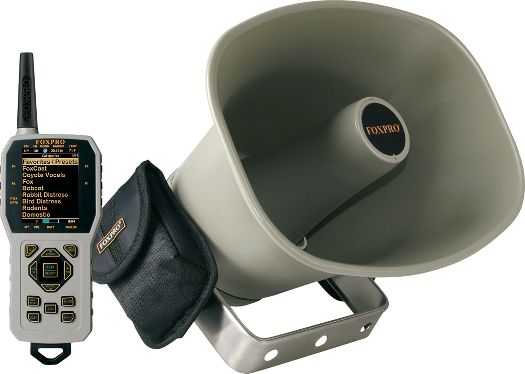
FOXPRO's NEW CS24K KRAKATOA II is the most powerful unit in the CS-24 series -- in fact, it's the most powerful FOXPRO unit ever!
Because of the extreme power levels available, this model is available only in the largest FOXPRO speaker size. The KRAKATOA II can produce over 60 total watts of power from the new class D power amplifier. That's more power than any FOXPRO unit to date! The TX1000 remote which made our SHOCKWAVE so popular is now included in the KRAKATOA II including, FOXFADE™, FOXCAST™, and FOXMOTION™. FOXBANG™ is another standard feature that comes with the KRAKATOA.
The KRAKATOA II is powered by dual 10-cell welded rechargeable battery packs (included) and comes with a dual rate smart fast battery charger.
The KRAKATOA II comes standard with 100 high quality FOXPRO sounds and the TX-1000 remote control. The TX-1000 features a full color graphic LCD screen which displays your sound list or sound categories, has a barometer indicator, moon phase indicator, temperature indicator, battery level indicator, timer or time clock, FOXBANG technology and much more. The
KRAKATOA II is backed by a 5 year limited warranty and FOXPRO's unmatched customer support and is proudly made in the USA
Key Features
- The KRAKATOA II comes standard with 100 high-quality soundsof your choice!
- 24-Bit Audio - 24-bit audio for extreme audio performance.
- Store and play up to 1000 sounds with the massive internal memory!
- The KRAKATOA II can play .mp3, uncompressed .wav, .fxp (FOXPRO's proprietary file type), and .24b (FOXPRO's 24-bit file type).
- Dual 25W Amplifiers - Produces loudness and clarity that is second to none.
- External Speaker Jack - Connect an additional speaker to the KRAKATOA II for insane volume! By adding an external speaker, FOXFADE can come to life!
- USB 2.0 Port - Quickly and easily reprogram your KRAKATOA II right from your computer!
- Dual 10-cell Welded Battery Packs - Provide great run time and dependability. Keep these batteries charged with the included dual-rate fast smart battery charger!
- Low Battery Indicator Battery Management System - Operates on two 10 'AA' Welded Battery Packs
- EXTREME volume capability (perfect for crow, geese, waterfowl and open country predator callers)
- Dimensions: 12" x 10.5" x 7.5"
- Weight: 4.5 lbs w/ batteries
- Connectivity: USB
- External Speaker Jack
- Auxiliary Device Jack
- Sound Capacity: 1,000 (comes with 100)
- Compatible File Formats: MP3, WAV, 24B, and FXP
- Power Requirements: 2ea Battery Packs (included)
- Warranty: Limited, 5 years
- Made in USA!
Key TX1000 Remote Control Features
- Extra-Large 2.7" LCD Panel
- The extra large LCD panel provides easy to read text and menu navigation.
- Remote is powered by three AA batteries (not included)
- Custom Sound Presets - Store up to 50 custom sound presets with individual volume levels. Four quick access preset buttons are located on the side of the TX-1000
- Custom Sound Sequences - Design entire stands including the individual sounds, volume levels, durations, and passages of silence. When selected, a custom sequence will go through the steps you defined and complete your entire calling sequence without requiring any need for using the remote control
- Volume "UP/DOWN" buttons
- Mute Button
- Preset buttons for favorite sounds
- FOXBANG™ Automatically switches to your preset #1 after you shoot.
- FOXMOTION™ Mimic moving prey by fading sound from left speaker to right one (when external speaker is used).
- AUTO VOLUME™ Automatically ramps up and modulate
- FOXDATA™ Activate FOXDATA and it records real time information (temp, barometer, moon phase, stand duration, etc) from each stand. Over time you will be able to predict animal activity/hunting success based on hard data.
- FOXCAST™ Virtually hands-free calling with FOXCAST sequence files.
- Please Note the FOXFUSION & FOXPITCH is NOT available in the CS24K
- See the CS24K Krakatoa II Product Manual HERE
SOUND PROGRAMMING
- If you select "Standard Factory Programming" The KRAKATOA II will come programmed with standard factory sound list - See Standard Factory Sound Listing HERE.
- If you select "Custom Programming" when adding to the shopping cart, then the SHOCKWAVE comes with 100 calls of your choice. Preview and pick your calls here:


AllPredatorCalls.com is an Authorized Dealer and FOXPRO Sound Programming Facility. We stock a huge inventory of FOXPRO electronic calls. All FOXPRO models purchased INCLUDE FREE CUSTOM SOUND PROGRAMMING - YES! - You get to pick the sounds that are on your call! We custom program it and promptly ship the next business day! A FULL factory warranty is included with each FOXPRO product purchased from AllPredatorCalls.com. FOXPRO products purchased from websites without the FOXPRO Authorized Logo are sold without warranty or support.